To celebrate the introduction of the Emission Trading Scheme (ETS*) in New Zealand today (1 July 2010), I thought I’d publish the following article on what I’m doing in terms of residential Power Monitoring.
Read on for:
The Back Story
A few years ago, I was working on what devices would sit in an ‘average’ connected home and, given the sheer volume of ‘things’ – it be came clear that not only would a homeowner need to justify the existence of each device, but also their unseen costs in terms of installation, maintenance and ongoing power usage.
 To answer the last of these, I bought a device called a Centameter which, aside from the benefit of being designed in NZ, measured the current power usage via an induction clamp and transmitter which sits in the power meter box and sends the data through to a LCD display.
After a couple of attempts to elicit a response from the manufacturer, I asked an electrical engineering friend of mine to see what information they could pull from the display unit as we wanted to capture and graph this data over time. The short story is, while we could get some information out of the device, the time required to make this meaningful far exceeded what he was able to donate to the project so things were shelved – until now.
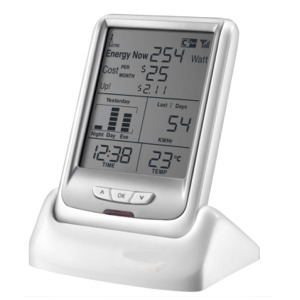 I recently ordered, and received a ‘CurrentCost‘ device from a company in Australia which essentially replicated the functionality of the device I was playing with a few years back – the difference being, the ‘CurrentCost Envi‘ includes a data port, and with the addition of a RJ45 to USB serial cable, it will spit out an XML file ever six seconds which can be directly ingested by a number of programs.
The idea of this is that a household can track their power usage over time and, via the visualisations provided by programs which interpret and graph this information.
The psychology surrounding this is that once power usage can be observed in real time and charted over time, the household tends to attempt to reduce their usage and in turn realise ever increasing efficiencies. On a wider scale, this data has also been used in some markets to compare households against each other adding an additional efficiency driver (that of competition) into the desire to reduce ones usage.
The Unboxing
Currently (despite also having a clone website in the .nz domain) orders for this device go through Australia and – while it took awhile to arrive, it was well protected from the postal service and was delivered unmangled, which is always a good start.
 |
 |
 |
The instructions which came with the unit were written very well and on testing them with a non-tech, they appear to even be understandable – where they fell down was in explaining where and how to attach the induction clamp. I can’t fault the distributor for this however as, in Australia, the work must be performed by a registered electrician – who should know what they’re doing…
Installing the Device
As mentioned, the installation guide is an easy read, and there are only really 3 (or 4) parts to the whole thing.
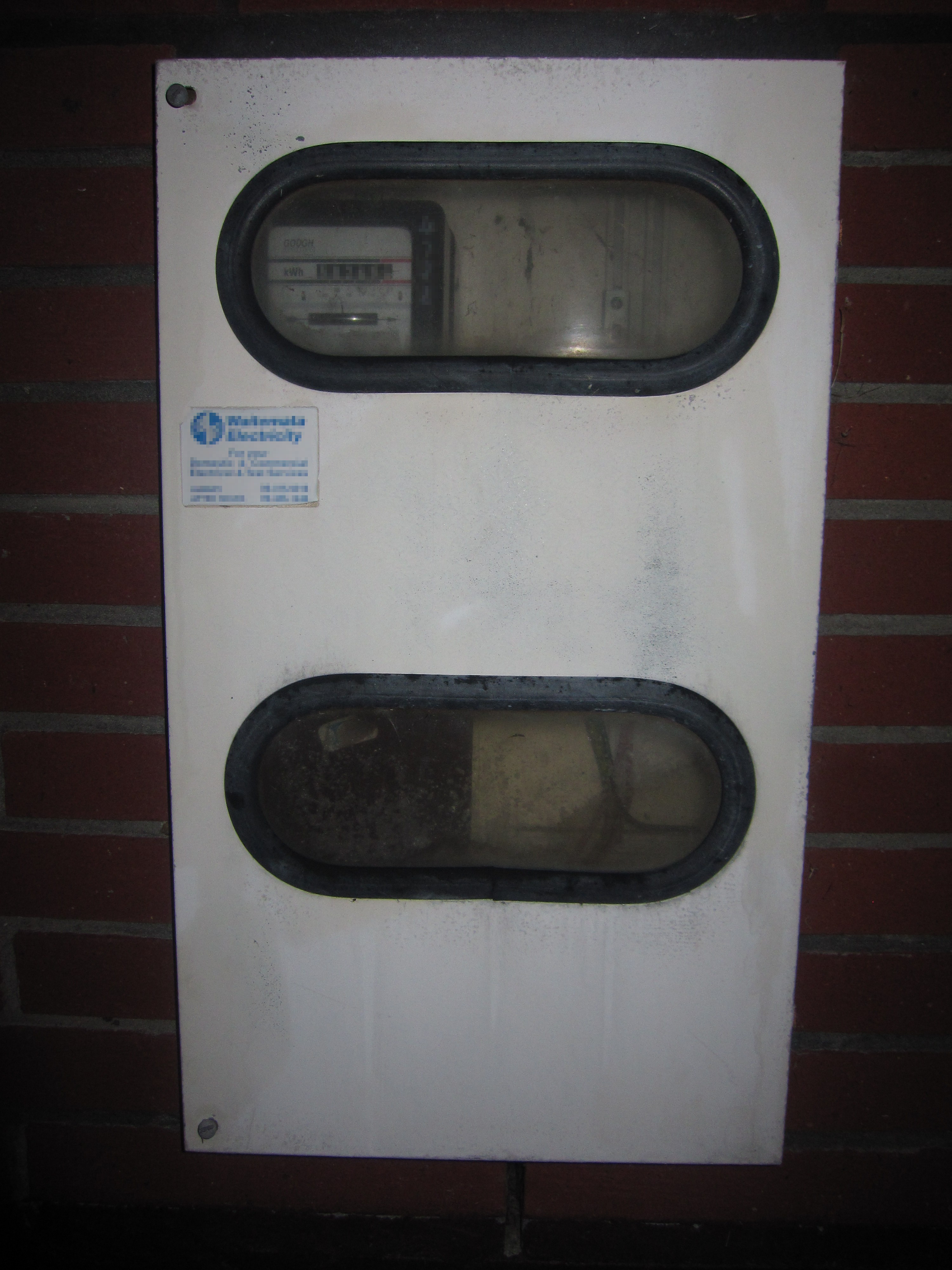
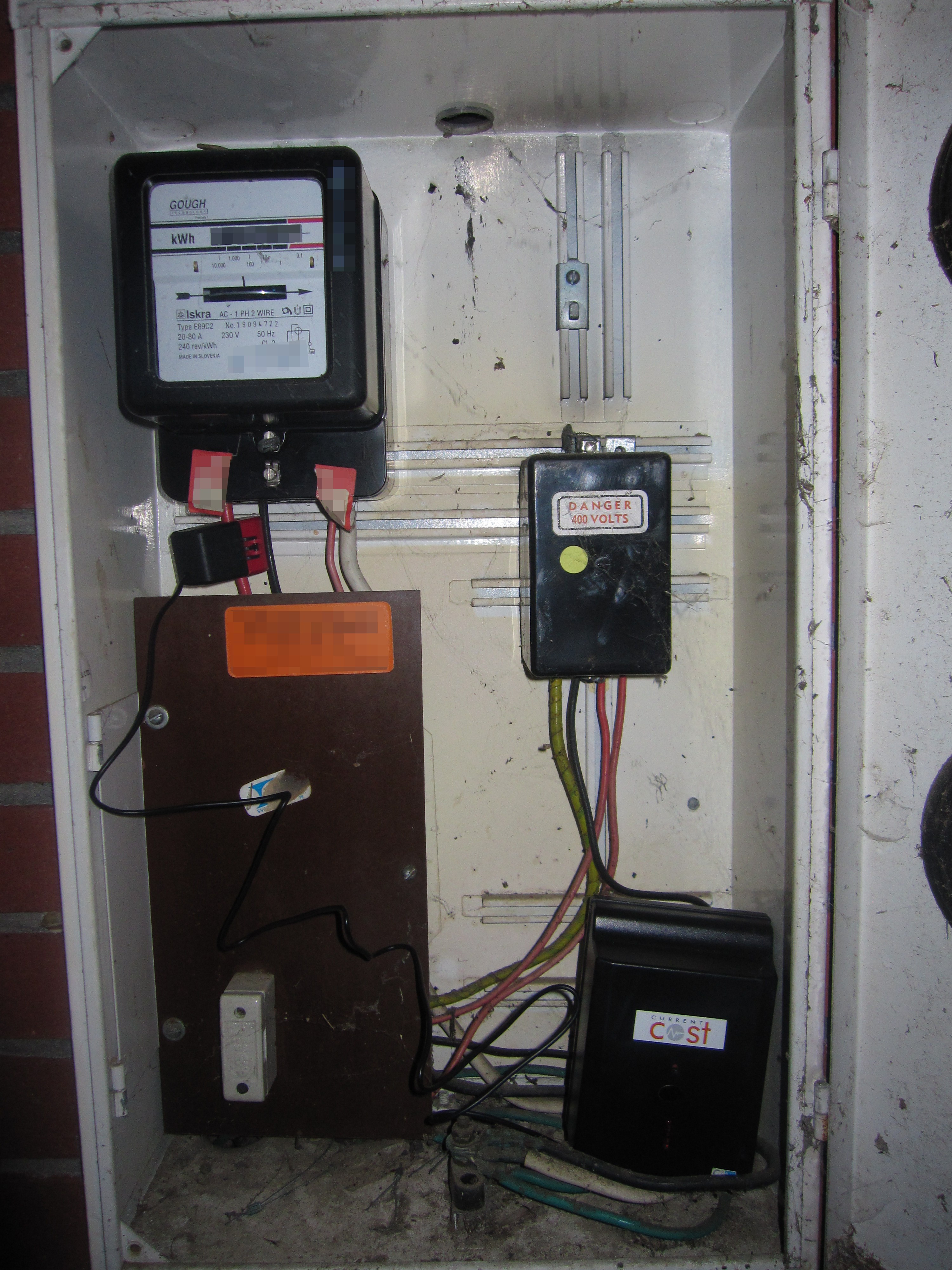
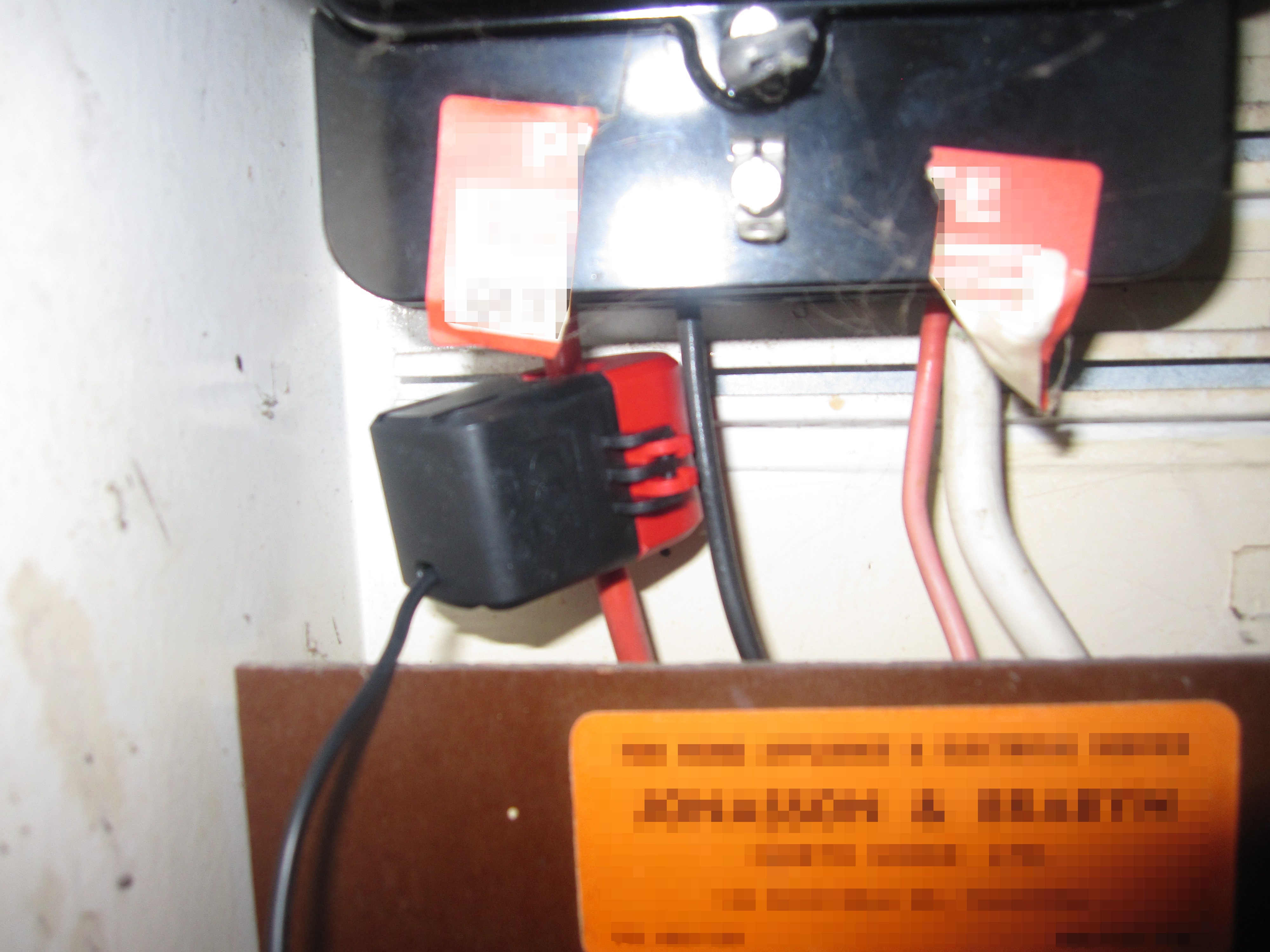
Before you can start receiving any data, the clamp needs to be popped around the main house electrical feed, and the other end of the clamp attached to the large black transmitter box. While in Australia it’s a requirement to have an electrician do this work, if you know what you’re doing you can install the clamp yourself (here in New Zealand). The power box you’re sticking your hand in can be a dangerous place – so if you’re in the least bit unsure, get an electrician to do the job.
 |
 |
 |
Once installed, you’ll find that the base unit is starting to record data – while it’s fine to stop at this point, the planet can wait a few more minutes so try to resist the urge – next we need to acquire and install the software, and connect the Envi to your data logging PC.
Configuring the Software
Start your download journey here and select the manufacturer – we don’t have any NZ based utilities listed yet – it’ll be interesting to see when or if that changes. Click Activate (if you’ve got all the bits – don’t be an idiot like I was and overlook the data cable in your initial order). Fill in some details to register, then read all the system requirements – and download the Google powermeter software. At this point you’ll probably want to attach the RJ45 to USB serial cable to the back of the Envi device, and get ready to plug it into your data logging PC.
It’s important to note that you will need to install the driver software for the serial to USB cable which will pull the data from the unit, without it – the unit doesn’t get found and you can’t really move on to activating your device…
 |
 |
 |
 |
Once all the software and drivers have been downloaded and installed, start up the ‘Current Cost Google PowerMeter’ application (Step1). You will be asked to name your device – do NOT use a hyphen ( ‘-‘ ) in the name as it generates a rather unfriendly error message and crashes the program. Once your device is named, click the link to register it with Google PowerMeter.
I found that unless I had a browser already open (and had logged into the Google Account I was planning to use to link the power meter t0), the program would crash at this point. Your mileage may vary, but if you are getting weird results like this, simply open up a browser, log into Gmail and then click the link. This may or may not mean you’ll see Step 2.
If the stars have aligned you’ll successfully be through to the next step, which is to enter yet more information as to your location, and what you want to call the device (Step 3). Employ your own level of tinfoil cap wearing, I didn’t see any issues using false, or factual data – so it’s more than likely a ‘future growth’ data point – possibly to allow us to compete locally with other device owners in the area.
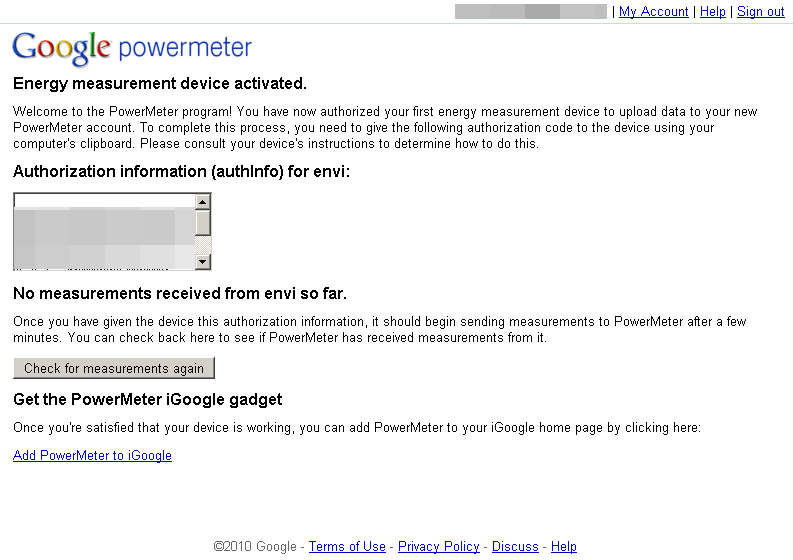
You will then be presented with a long bunch of information (Step 4) which you will need to copy from the ‘Authorisation information’ box in your browser, and past into the ‘activation text’ box in the Current Cost software (Step 5). Save the info and you’ll be told to create a database to store all the information from the device to (Step 6).
Note: I found that the software seems to be tied to a users login as, after logging in to my limited access account and opening the software, I was required to go through Steps 1-5 again, and Step 6 wiped the existing database file.
The database should be created (step 7), the authentication information should pass muster (Step 8) and you are then returned to the Current Cost application (Step 9). From here you can attempt to do a history download from the device (didn’t work for me, best of luck with that), and you can then connect the software to Google.
Click the PowerMeter graph link and wait for the 10 torturous minutes for the first data to arrive and be parsed by Google.
 |
 |
 |
 |
 |
 |
 |
 |
 |
There are a few settings within the Google PowerMeter (GPM) worthy of attention, the main one of course being the Estimated cost per kW·h, filling this in will allow for estimates of costs to be generated. Don’t forget to study your power bill closely for the cents per kW·h you are charged & don’t forget to add the government levy on top of that too. For some reason GPM doesn’t pull this information off the unit, which kind of sucks as there only appears to be a one rate option in GPM so if you’re on a Peak/Off Peak charging scheme for your power, the costings are going to be pretty meaningless – you may want to concentrate on simply using the usage information to drive your reductions, or you might want to check out some of the other available software for the Current Cost devices.
Results
At the time of writing I haven’t captured enough data (thanks history download failure) to create any meaningful visualisations, but once more information has been captured, I’ll post a few images of the screens within GPM for your viewing pleasure.
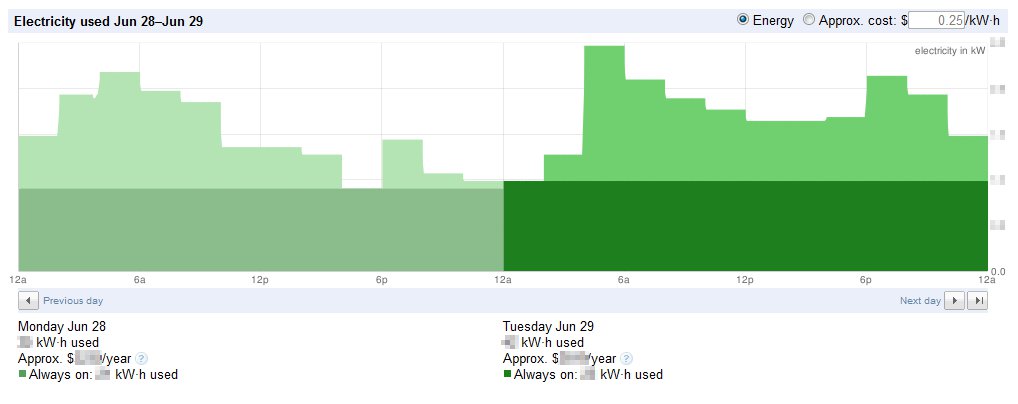
Updated: Here are a images captured from Google Power Meter now that I’ve successfully down/uploaded the history from the device.


*The ETS is an initiative set to raise most consumer prices by ~10% via a tax on carbon emissions based on dubious science, poor understanding on behalf of the Government, the desire to jump on the ‘Green’ bandwagon and the self indulgent ego-stroking of a handful of politicians who have pushed this through. This of course is my opinion, based on a number of interesting articles I have read.
Comments
20 responses to “Profiling my Power”
I like it! Nicely written post. I was in fact just looking at these devices a couple of days ago and wondering how easy it would be to install.
[…] This post was mentioned on Twitter by Rob Inskeep, Simon Gianoutsos. Simon Gianoutsos said: CurrentCost + Google PowerMeter = Increased visibility of home electricity use (Post by @nzrob) http://bit.ly/bxACzp […]
I would be very interested in seeing the results
@Simon – Apart from a few teething troubles I'm still working through, they're proving fairly easy to setup – I'd say go for it, if this kind of thing spins your wheels that is…
@Neal – Your command is my wish – have managed to extract some history and generate some graphs for you 🙂
Hi Rob, a great post – the detail you have included is very useful.
I like your comment "if the stars have aligned…" I agree it's not the simplest set-up (Google PowerMeter), but once working it's great (and for the less geeky – the display on the meter itself is pretty good on its own anyway)
By the way, we are currently retailing this device (see below) and would be happy to post to NZ: http://steplight.com.au/wireless-real-time-home-e…
Your readers may be interested to read some of the "why use this meter" items we have included above.
Ryan.
Thanks for that Ryan – I'm interested at how well the device has gone across in the Western island… I've found a few places there selling these (and similar) devices. As I say in the article, it will be interesting to see how the market here adopts real-time monitoring.
Still very much with the 'early adopters' I think…. but we ( http://steplight.com.au/ ) will soon be installing a few hundred for an energy utility over here, so that will be good to see what the 'general population' thinks of it!
Nice post
Like Simon, I had been wondering about these devices as an upgrade to our old centameter. Can you export data just to a local PC for your own graphing or is GPM a requirement? I want to integrate some other data into a farm web dashboard (and we have 3 phases on different tarrifs to munge into cost/use graphs).
Thanks @farmgeek for tweeting this. I was looking at the CurrentCost device myself a few weeks ago. I'm not too keen on using GPM, aiming instead of doing something more akin to a dashboard like @farmgeek but posting the data to pachube for worldwide dissemination (if I so chose). Thanks for the writeup Rob – bookmarked.
Thanks! 🙂
Pachube is also supported – there's a surprisingly active community around building applications for the meter – I'm almost tempted to grab the feed myself and write my own app… almost. Now if someone could point me to a Media Center plugin, I could then get the kids to keep an eye on the power use without having to furnish them with fulltime PC access 🙂
Yep – well, you can buy additional clamps to handle the 3 phase supply (and solar), and GPM is certainly not the only software out there… I'm currently looking at a couple of other ones which allow far more flexibility (but obviously require more configuration) – I'm just trying to avoid losing history as I switch between the two so need to get a serial visualisation tool on there so I can duplicate the data coming in to another 'virtual' COM port for the alternate software to work from.
Your post is great, thanks.
I believe the transmitter in the meter box is battery powered. Is there a voltage connection made and/or how does it know what voltage it is at that moment ?
Also, can you detect power factor/real power for things like motors?
Hmm – good questions Paul. Yes the transmitter box is battery powered (should have mentioned that, sorry). There's no direct voltage connection made between the transmitter and the power box, the clamp measures the current passing through the house feed cable and sends that via the transmitter to the display unit (which in turn downloads the figure every 6ish seconds to the software on the PC, which uploads the average every 10 minutes to GPM…)
Really not sure on the power factor / real power question, you can attach additional clamps to specific appliances (like a heat pump / clothes dryer) and assign that to one of the appliance slots on the display unit. I'd suggest trying the manufacturer http://bit.ly/9DUQ5z as a starting point for more specifics, as mentioned in the article, there's a surprisingly active community around these devices too so someone there may be able to help? Try http://bit.ly/d27M27
Hi Paul,
The voltage is an assumed 240v and power factor is not detected. We have a new webshop available at http://www.smartnow.co.nz. Also, for anyone interested in writing their own software application there is a wealth of information available at our Wiki site http://www.smartnow.com.au/Wikka/SoftwareSolution – XML data output, XML parsers etc. If we can help at all please don't hesitate to contact us via the contact details on our site.
Kind regards,
Ian Ballantyne
Technical Director
SmartNow – Australasian Distributor for Current Cost.
Tis is very cool.
Power companies should phase something like this in (incl cheap wifi interface) linked back to your home broadband modem. With scale this could be done for a few bucks. Your power account linked into your google account, what could possibly go wrong?
DIY kits would be another option if safety could be assured, although seems unlikely.
Business case might be based on reduced number of meter reads ($) and generation and transmission cost avoidance ($$$$$$) from modified consumer habits.
Motorola VE440:
Great article. How did you get time to do all this. Very helpful article.
Rob, Got it all up and running. Was a piece of cake really. Interesting to look at the trends on a day to day basis – knowing what was running and when. (You can even see the fridge turning on and off!)
send me an email and I'll give you access to my page – if you want that is
Hi I am using GPM would be keen on sharing with NZ homes, I have a few UK and American homes
Hey great to hear it's been a useful article for you 🙂
I'd love to see you link back with a rundown of your off-grid setup, I was just discussing domestic generation grids yesterday with someone who is investigating 'smart devices' in terms of efficiencies gained by generating where the need is, rather than 100s of kilometers away, and transporting the power up big ugly lines, with all the loss which occurs along the way.
Oh – and if you can convince my wife to let us build a house from the ground up and let me do an off grid system with it, I'll buy you a beer or three 🙂
Good comments people.
I have been using current cost ENVI for more than a year on pachube.com, then google power meter and last week added the Currentcost Bridge (saving continuous laptop running and occasional lockups) . Installation was a breeze following the few instructions, current cost web display is informative but does not trend where as the google powermeter site does (both can run on the same device feed).
Only frustration is I don't seem to be able to bring my pre bridge history into the post bridge database. check here for more information http://my.opera.com/mikepotts64/blog/